
Introduction
In modern full-stack development, maintaining type safety across frontend and backend can be challenging. Different teams might duplicate type definitions, leading to inconsistencies and runtime errors. In this guide, we’ll explore how to create a shared types package in a Turborepo monorepo, leveraging Zod schemas for both validation and type generation, integrated seamlessly with NestJS and TanStack Router.
Video + Shoutout
This project starts from the one we’ve built in my latest video on building a full-stack To-Do application with TanStack Router + NestJS. If you haven’t seen it yet, check it out here.
Shoutout to X user @DutchLemonade who suggested the idea of looking into shared types with nestjs-zod.
What We’ll Build
By the end of this tutorial, you’ll have:
- A shared types package using Zod schemas
- Automatic DTO generation and validation in NestJS using
nestjs-zod - Type-safe API calls in TanStack Router frontend
- Single source of truth for all data structures
- Automatic validation on both request and response
Repository
The GitHub repository with the full code for this project can be found here.
Prerequisites
- Node.js 18+
- pnpm (or npm/yarn)
- Basic understanding of TypeScript, NestJS, and React
- An existing Turborepo monorepo (or follow along to create one)
Project Structure
Our monorepo structure looks like this:
tanstack-nestjs/
├── apps/
│   ├── api/          # NestJS backend
│   └── web/          # TanStack Router frontend
├── packages/
│   └── shared-types/ # Shared Zod schemas and types
├── package.json
├── pnpm-workspace.yaml
└── turbo.json
Step 1: Create the Shared Types Package
First, let’s create our shared types package that will house all Zod schemas.
1.1 Setup Package Structure
mkdir -p packages/shared-types/src1.2 Create package.json
packages/shared-types/package.json:
{
  "name": "@repo/shared-types",
  "version": "0.0.0",
  "private": true,
  "main": "./dist/index.js",
  "types": "./dist/index.d.ts",
  "exports": {
    ".": {
      "types": "./dist/index.d.ts",
      "import": "./dist/index.js",
      "require": "./dist/index.js"
    }
  },
  "scripts": {
    "build": "tsc",
    "dev": "tsc --watch",
    "check-types": "tsc --noEmit",
    "lint": "eslint src/"
  },
  "dependencies": {
    "zod": "^3.24.1"
  },
  "devDependencies": {
    "@types/node": "^22.10.6",
    "typescript": "^5.7.3"
  }
}Note: The package builds to
dist/using CommonJS format, which works with both the ESM frontend (Vite handles it) and the CommonJS NestJS backend.
1.3 Configure TypeScript
packages/shared-types/tsconfig.json:
{
  "compilerOptions": {
    "target": "ES2021",
    "module": "commonjs",
    "lib": ["ES2021"],
    "moduleResolution": "node",
    "strict": true,
    "esModuleInterop": true,
    "skipLibCheck": true,
    "forceConsistentCasingInFileNames": true,
    "declaration": true,
    "declarationMap": true,
    "outDir": "./dist"
  },
  "include": ["src/**/*"],
  "exclude": ["node_modules", "dist"]
}Important: We use CommonJS module format here because NestJS requires CommonJS. The compiled output works seamlessly with both the NestJS backend and the Vite frontend (which can consume CommonJS modules).
1.4 Update Workspace Configuration
pnpm-workspace.yaml:
packages:
  - "apps/*"
- "packages/*"Step 2: Define Zod Schemas
Now let’s create our Zod schemas. The beauty of Zod is that we can define our schemas once and use them for both validation and TypeScript type inference.
packages/shared-types/src/task.schema.ts:
import { z } from 'zod';

// Task status enum
export const TaskStatusSchema = z.enum(['todo', 'in-progress', 'done']);
export type TaskStatus = z.infer<typeof TaskStatusSchema>;

// Base Task schema
export const TaskSchema = z.object({
  id: z.string().uuid(),
  title: z.string().min(1, 'Title is required'),
  description: z.string(),
  status: TaskStatusSchema,
  createdAt: z.string().datetime(),
  updatedAt: z.string().datetime(),
});

export type Task = z.infer<typeof TaskSchema>;

// Create Task DTO schema
export const CreateTaskDtoSchema = z.object({
  title: z.string()
    .min(1, 'Title is required')
    .max(200, 'Title must be less than 200 characters'),
  description: z.string().optional().default(''),
});

export type CreateTaskDto = z.infer<typeof CreateTaskDtoSchema>;

// Update Task DTO schema
export const UpdateTaskDtoSchema = z.object({
  title: z.string()
    .min(1, 'Title is required')
    .max(200, 'Title must be less than 200 characters')
    .optional(),
  description: z.string().optional(),
  status: TaskStatusSchema.optional(),
});

export type UpdateTaskDto = z.infer<typeof UpdateTaskDtoSchema>;

// Query params schema for filtering tasks
export const TaskQueryParamsSchema = z.object({
  status: TaskStatusSchema.optional(),
  search: z.string().optional(),
});

export type TaskQueryParams = z.infer<typeof TaskQueryParamsSchema>;packages/shared-types/src/index.ts:
// Export all schemas and types
export {
  TaskSchema,
  TaskStatusSchema,
  CreateTaskDtoSchema,
  UpdateTaskDtoSchema,
  TaskQueryParamsSchema,
  type Task,
  type TaskStatus,
  type CreateTaskDto,
  type UpdateTaskDto,
  type TaskQueryParams,
} from './task.schema';Step 3: Integrate with NestJS Backend
Now let’s integrate our shared types with NestJS using the nestjs-zod library.
3.1 Install Dependencies
cd apps/api
pnpm add nestjs-zod '@repo/shared-types@workspace:*'
3.2 Configure Global Validation Pipe
apps/api/src/main.ts:
import { NestFactory } from '@nestjs/core';
import { AppModule } from './app.module';
import { ZodValidationPipe } from 'nestjs-zod';

async function bootstrap() {
  const app = await NestFactory.create(AppModule);

  // Enable global validation with Zod
  app.useGlobalPipes(new ZodValidationPipe());

  app.enableCors({ origin: '<http://localhost:3000>' });
  await app.listen(process.env.PORT ?? 3001);
}
bootstrap();apps/api/src/app.module.ts:
import { Module } from '@nestjs/common';
import { APP_PIPE } from '@nestjs/core';
import { ZodValidationPipe } from 'nestjs-zod';
import { AppController } from './app.controller';
import { AppService } from './app.service';
import { TasksModule } from './tasks/tasks.module';

@Module({
  imports: [TasksModule],
  controllers: [AppController],
  providers: [
    AppService,
    {
      provide: APP_PIPE,
      useClass: ZodValidationPipe,
    },
  ],
})
export class AppModule {}3.3 Create Auto-Generated DTOs
The nestjs-zod library provides a createZodDto helper that automatically creates NestJS DTOs from Zod schemas:
apps/api/src/tasks/dto/create-task.dto.ts:
import { createZodDto } from 'nestjs-zod';
import { CreateTaskDtoSchema } from '@repo/shared-types';

export class CreateTaskDto extends createZodDto(CreateTaskDtoSchema) {}apps/api/src/tasks/dto/update-task.dto.ts:
import { createZodDto } from 'nestjs-zod';
import { UpdateTaskDtoSchema } from '@repo/shared-types';

export class UpdateTaskDto extends createZodDto(UpdateTaskDtoSchema) {}3.4 Update Service to Use Shared Types
apps/api/src/tasks/tasks.service.ts:
import { Injectable, NotFoundException } from '@nestjs/common';
import { Task, CreateTaskDto as CreateTaskDtoType, UpdateTaskDto as UpdateTaskDtoType } from '@repo/shared-types';
import { CreateTaskDto } from './dto/create-task.dto';
import { UpdateTaskDto } from './dto/update-task.dto';

@Injectable()
export class TasksService {
  private tasks: Task[] = [
    {
      id: '1',
      title: 'Learn TanStack Start',
      description: 'Explore file-based routing and server functions',
      status: 'in-progress',
      createdAt: new Date().toISOString(),
      updatedAt: new Date().toISOString(),
    },
    // ... more tasks
  ];

  findAll(status?: string, search?: string): Task[] {
    let result = this.tasks;

    if (status && status !== 'all') {
      result = result.filter((task) => task.status === status);
    }

    if (search) {
      const searchLower = search.toLowerCase();
      result = result.filter(
        (task) =>
          task.title.toLowerCase().includes(searchLower) ||
          task.description.toLowerCase().includes(searchLower),
      );
    }

    return result;
  }

  findOne(id: string): Task {
    const task = this.tasks.find((t) => t.id === id);
    if (!task) {
      throw new NotFoundException(`Task with ID "${id}" not found`);
    }
    return task;
  }

  create(createTaskDto: CreateTaskDto | CreateTaskDtoType): Task {
    const dto = createTaskDto as CreateTaskDtoType;
    const task: Task = {
      id: Date.now().toString(),
      title: dto.title,
      description: dto.description || '',
      status: 'todo',
      createdAt: new Date().toISOString(),
      updatedAt: new Date().toISOString(),
    };
    this.tasks.push(task);
    return task;
  }

  update(id: string, updateTaskDto: UpdateTaskDto | UpdateTaskDtoType): Task {
    const task = this.findOne(id);
    const dto = updateTaskDto as UpdateTaskDtoType;
    Object.assign(task, dto, { updatedAt: new Date().toISOString() });
    return task;
  }

  remove(id: string): void {
    const index = this.tasks.findIndex((t) => t.id === id);
    if (index === -1) {
      throw new NotFoundException(`Task with ID "${id}" not found`);
    }
    this.tasks.splice(index, 1);
  }
}3.5 Update Controller
apps/api/src/tasks/tasks.controller.ts:
import {
  Controller,
  Get,
  Post,
  Body,
  Patch,
  Param,
  Delete,
  Query,
} from '@nestjs/common';
import { TasksService } from './tasks.service';
import { CreateTaskDto } from './dto/create-task.dto';
import { UpdateTaskDto } from './dto/update-task.dto';

@Controller('tasks')
export class TasksController {
  constructor(private readonly tasksService: TasksService) {}

  @Post()
  create(@Body() createTaskDto: CreateTaskDto) {
    return this.tasksService.create(createTaskDto);
  }

  @Get()
  findAll(@Query('status') status?: string, @Query('search') search?: string) {
    return this.tasksService.findAll(status, search);
  }

  @Get(':id')
  findOne(@Param('id') id: string) {
    return this.tasksService.findOne(id);
  }

  @Patch(':id')
  update(@Param('id') id: string, @Body() updateTaskDto: UpdateTaskDto) {
    return this.tasksService.update(id, updateTaskDto);
  }

  @Delete(':id')
  remove(@Param('id') id: string) {
    this.tasksService.remove(id);
    return { success: true };
  }
}Step 4: Integrate with TanStack Router Frontend
Now let’s use the same types in our frontend application.
4.1 Install Shared Types Package
cd apps/web
pnpm add '@repo/shared-types@workspace:*'
4.2 Update Frontend Types
apps/web/src/lib/types.ts:
// Re-export shared types
export type {
  Task,
  TaskStatus,
  CreateTaskDto,
  UpdateTaskDto,
  TaskQueryParams,
} from '@repo/shared-types';

// Frontend-specific type for filtering (includes 'all')
import type { TaskStatus as TS } from '@repo/shared-types';
export type TaskStatusFilter = TS | 'all';4.3 Update API Client
apps/web/src/lib/api.ts:
import type { Task, CreateTaskDto, UpdateTaskDto } from './types';

const API_URL = import.meta.env.VITE_API_URL;

export const api = {
  tasks: {
    list: async (params?: { status?: string; search?: string }): Promise<Task[]> => {
      const searchParams = new URLSearchParams();
      if (params?.status && params.status !== 'all') {
        searchParams.set('status', params.status);
      }
      if (params?.search) {
        searchParams.set('search', params.search);
      }
      const query = searchParams.toString();
      const res = await fetch(`${API_URL}/tasks${query ? `?${query}` : ''}`);
      if (!res.ok) throw new Error('Failed to fetch tasks');
      return res.json();
    },

    create: async (data: CreateTaskDto): Promise<Task> => {
      const res = await fetch(`${API_URL}/tasks`, {
        method: 'POST',
        headers: { 'Content-Type': 'application/json' },
        body: JSON.stringify(data),
      });
      if (!res.ok) throw new Error('Failed to create task');
      return res.json();
    },

    update: async (id: string, data: UpdateTaskDto): Promise<Task> => {
      const res = await fetch(`${API_URL}/tasks/${id}`, {
        method: 'PATCH',
        headers: { 'Content-Type': 'application/json' },
        body: JSON.stringify(data),
      });
      if (!res.ok) throw new Error('Failed to update task');
      return res.json();
    },

    // ... other methods
  },
};4.4 Update TanStack Query Hooks
apps/web/src/lib/queries.ts:
import { useQuery, useMutation, useQueryClient } from '@tanstack/react-query';
import { api } from './api';
import type { CreateTaskDto, UpdateTaskDto } from './types';

// ... query keys

export function useCreateTaskMutation() {
  const queryClient = useQueryClient();

  return useMutation({
    mutationFn: (data: CreateTaskDto) =>
      api.tasks.create(data),
    onSuccess: () => {
      queryClient.invalidateQueries({ queryKey: taskKeys.lists() });
    },
  });
}

export function useUpdateTaskMutation() {
  const queryClient = useQueryClient();

  return useMutation({
    mutationFn: ({ id, data }: { id: string; data: UpdateTaskDto }) =>
      api.tasks.update(id, data),
    onSuccess: (updatedTask) => {
      queryClient.setQueryData(taskKeys.detail(updatedTask.id), updatedTask);
      queryClient.invalidateQueries({ queryKey: taskKeys.lists() });
    },
  });
}Step 5: Response Validation with ZodSerializerInterceptor
One of the powerful features of nestjs-zod is the ability to validate responses on the server side. This ensures that your API always returns data matching your schemas, catching bugs before they reach the client.
5.1 Create Response DTOs
apps/api/src/tasks/dto/task-response.dto.ts:
import { createZodDto } from 'nestjs-zod';
import { TaskSchema } from '@repo/shared-types';

export class TaskResponseDto extends createZodDto(TaskSchema) {}apps/api/src/tasks/dto/delete-task-response.dto.ts:
import { z } from 'zod';
import { createZodDto } from 'nestjs-zod';

const DeleteTaskResponseSchema = z.object({
  success: z.boolean(),
});

export class DeleteTaskResponseDto extends createZodDto(DeleteTaskResponseSchema) {}5.2 Apply Response Validation
Update your controller to use ZodSerializerInterceptor and type your responses:
apps/api/src/tasks/tasks.controller.ts:
import {
  Controller,
  Get,
  Post,
  Body,
  Patch,
  Param,
  Delete,
  Query,
  UseInterceptors,
} from '@nestjs/common';
import { ZodSerializerInterceptor, ZodSerializerDto } from 'nestjs-zod';
import { TasksService } from './tasks.service';
import { CreateTaskDto } from './dto/create-task.dto';
import { UpdateTaskDto } from './dto/update-task.dto';
import { TaskResponseDto } from './dto/task-response.dto';
import { DeleteTaskResponseDto } from './dto/delete-task-response.dto';

@Controller('tasks')
@UseInterceptors(ZodSerializerInterceptor) // Apply to all routes in controller
export class TasksController {
  constructor(private readonly tasksService: TasksService) {}

  @Post()
  @ZodSerializerDto(TaskResponseDto)
  create(@Body() createTaskDto: CreateTaskDto): TaskResponseDto {
    return this.tasksService.create(createTaskDto);
  }

  @Get()
  @ZodSerializerDto(TaskResponseDto)
  findAll(
    @Query('status') status?: string,
    @Query('search') search?: string,
  ): TaskResponseDto[] {
    return this.tasksService.findAll(status, search);
  }

  @Get(':id')
  @ZodSerializerDto(TaskResponseDto)
  findOne(@Param('id') id: string): TaskResponseDto {
    return this.tasksService.findOne(id);
  }

  @Patch(':id')
  @ZodSerializerDto(TaskResponseDto)
  update(
    @Param('id') id: string,
    @Body() updateTaskDto: UpdateTaskDto,
  ): TaskResponseDto {
    return this.tasksService.update(id, updateTaskDto);
  }

  @Delete(':id')
  @ZodSerializerDto(DeleteTaskResponseDto)
  remove(@Param('id') id: string): DeleteTaskResponseDto {
    this.tasksService.remove(id);
    return { success: true };
  }
}Important: The
@ZodSerializerDto()decorator is required on each route for response validation to work. TheZodSerializerInterceptoralone won’t validate responses – it needs the decorator to know which schema to use.
How Response Validation Works
The ZodSerializerInterceptor will:
- Intercept the response before it’s sent to the client
- Validate the response against the return type’s Zod schema
- Strip any properties not defined in the schema (data sanitization)
- Throw an error if the response doesn’t match the schema
This provides:
- Runtime safety: Catch bugs where your service returns unexpected data
- Data sanitization: Remove sensitive or unwanted fields automatically
- Type safety: TypeScript ensures your service methods return the correct types
Step 6: Swagger/OpenAPI Integration
nestjs-zod DTOs automatically integrate with NestJS Swagger, providing beautiful API documentation with accurate schemas!
6.1 Install Swagger
pnpm --filter api add @nestjs/swagger6.2 Configure Swagger
apps/api/src/main.ts:
import { NestFactory } from '@nestjs/core';
import { SwaggerModule, DocumentBuilder } from '@nestjs/swagger';
import { AppModule } from './app.module';
import { ZodValidationPipe } from 'nestjs-zod';

async function bootstrap() {
  const app = await NestFactory.create(AppModule);

  // Enable global validation with Zod
  app.useGlobalPipes(new ZodValidationPipe());

  // Configure Swagger - nestjs-zod DTOs automatically integrate
  const config = new DocumentBuilder()
    .setTitle('Tasks API')
    .setDescription('Tasks API with Zod validation and type-safe DTOs')
    .setVersion('1.0')
    .addTag('tasks')
    .build();

  const document = SwaggerModule.createDocument(app, config);
  SwaggerModule.setup('api', app, document);

  app.enableCors({ origin: '<http://localhost:3000>' });
  await app.listen(process.env.PORT ?? 3001);

  console.log(`Application is running on: <http://localhost>:${process.env.PORT ?? 3001}`);
  console.log(`Swagger documentation: <http://localhost>:${process.env.PORT ?? 3001}/api`);
}
bootstrap();6.3 Add Swagger Decorators
Enhance your controller with Swagger decorators for better documentation:
apps/api/src/tasks/tasks.controller.ts:
import { ApiTags, ApiOperation, ApiResponse, ApiQuery } from '@nestjs/swagger';
import { ZodSerializerDto } from 'nestjs-zod';

@ApiTags('tasks')
@Controller('tasks')
@UseInterceptors(ZodSerializerInterceptor)
export class TasksController {
  // ...

  @Post()
  @ApiOperation({ summary: 'Create a new task' })
  @ApiResponse({ status: 201, description: 'Task created successfully', type: TaskResponseDto })
  @ApiResponse({ status: 400, description: 'Invalid input' })
  @ZodSerializerDto(TaskResponseDto)
  create(@Body() createTaskDto: CreateTaskDto): TaskResponseDto {
    return this.tasksService.create(createTaskDto);
  }

  @Get()
  @ApiOperation({ summary: 'Get all tasks' })
  @ApiQuery({ name: 'status', required: false, enum: ['todo', 'in-progress', 'done'] })
  @ApiQuery({ name: 'search', required: false, type: String })
  @ApiResponse({ status: 200, description: 'List of tasks', type: [TaskResponseDto] })
  @ZodSerializerDto(TaskResponseDto)
  findAll(
    @Query('status') status?: string,
    @Query('search') search?: string,
  ): TaskResponseDto[] {
    return this.tasksService.findAll(status, search);
  }

  // ... other endpoints with similar decorators and @ZodSerializerDto()
}6.4 View Your API Documentation
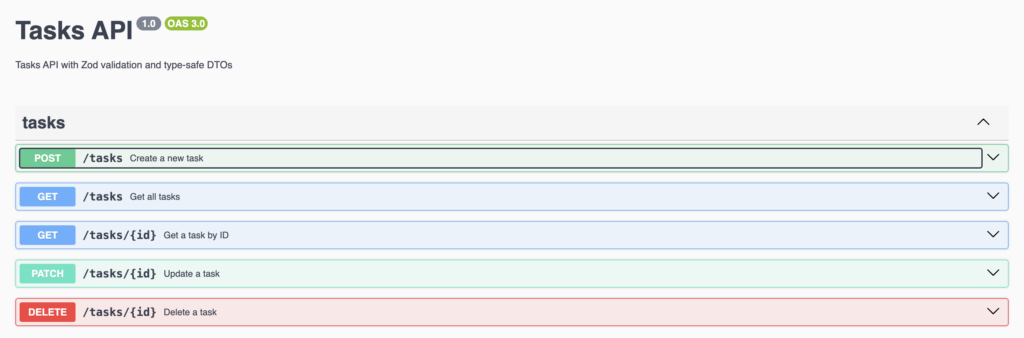
Start your server and visit http://localhost:3001/api to see your interactive Swagger documentation!
The Swagger UI will show:
- All available endpoints
- Request/response schemas (automatically generated from Zod schemas)
- Validation rules and constraints
- Try-it-out functionality to test your API
Step 7: Benefits and Testing
What We Achieved
- Single Source of Truth: All types are defined once in the shared package
- Request Validation: NestJS automatically validates incoming requests using Zod schemas
- Response Validation: Responses are validated and sanitized before being sent to clients
- Type Safety: TypeScript ensures type safety across the entire stack
- DRY Principle: No duplicate type definitions
- Runtime Safety: Zod provides runtime validation, catching errors early
- API Documentation: Swagger/OpenAPI docs automatically generated from Zod schemas
- Data Sanitization: Extra fields are automatically stripped from responses
Testing Validation
Try sending an invalid request to your API:
# Missing required field
curl -X POST <http://localhost:3001/tasks> \\
  -H "Content-Type: application/json" \\
  -d '{}'

# Response:
{"statusCode":400,"message":"Validation failed","errors":[{"code":"invalid_type","expected":"string","received":"undefined","path":["title"],"message":"Required"}]}%

# Title too long
curl -X POST <http://localhost:3001/tasks> \\
  -H "Content-Type: application/json" \\
  -d '{"title": "Lorem ipsum dolor sit amet, consectetur adipiscing elit, sed do eiusmod tempor incididunt ut labore et dolore magna aliqua. Ut enim ad minim veniam, quis nostrud exercitation ullamco laboris nisi ut aliquip ex ea commodo consequat. Duis aute irure dolor in reprehenderit in voluptate velit esse cillum dolore eu fugiat nulla pariatur."}'

# Response:
{"statusCode":400,"message":"Validation failed","errors":[{"code":"too_big","maximum":200,"type":"string","inclusive":true,"exact":false,"message":"Title must be less than 200 characters","path":["title"]}]}%
Step 8: Build and Run
8.1 Configure Turborepo
Update your turbo.json to ensure shared-types is built before running dev:
turbo.json:
{
  "$schema": "https://turborepo.com/schema.json",
  "ui": "tui",
  "tasks": {
    "build": {
      "dependsOn": ["^build"],
      "inputs": ["$TURBO_DEFAULT$", ".env*"],
      "outputs": [".output/**", "dist/**"]
    },
    "dev": {
      "dependsOn": ["^build"],
      "cache": false,
      "persistent": true
    }
  }
}The "dependsOn": ["^build"] ensures that the shared-types package is compiled before the api and web apps start in dev mode.
8.2 Build and Run
Build all packages:
pnpm buildRun in development:
pnpm devYour backend will be running on http://localhost:3001 and frontend on http://localhost:3000, both sharing the same type definitions!
Advanced: Client-Side Response Validation
While the server validates responses with ZodSerializerInterceptor, you can add an extra layer of safety by validating responses on the client side too:
apps/web/src/lib/api.ts:
import { TaskSchema } from '@repo/shared-types';
import { z } from 'zod';
import type { Task, CreateTaskDto, UpdateTaskDto } from './types';

const API_URL = import.meta.env.VITE_API_URL;

export const api = {
  tasks: {
    list: async (params?: { status?: string; search?: string }): Promise<Task[]> => {
      const searchParams = new URLSearchParams();
      if (params?.status && params.status !== 'all') {
        searchParams.set('status', params.status);
      }
      if (params?.search) {
        searchParams.set('search', params.search);
      }
      const query = searchParams.toString();
      const res = await fetch(`${API_URL}/tasks${query ? `?${query}` : ''}`);
      if (!res.ok) throw new Error('Failed to fetch tasks');
      const data = await res.json();

      // Validate response against Zod schema
      return z.array(TaskSchema).parse(data);
    },

    create: async (data: CreateTaskDto): Promise<Task> => {
      const res = await fetch(`${API_URL}/tasks`, {
        method: 'POST',
        headers: { 'Content-Type': 'application/json' },
        body: JSON.stringify(data),
      });
      if (!res.ok) throw new Error('Failed to create task');
      const responseData = await res.json();

      // Validate response against Zod schema
      return TaskSchema.parse(responseData);
    },
  },
};This provides:
- Defense in depth: Extra validation layer on the client
- Type safety: Ensures API responses match expected types
- Error detection: Catch API changes or bugs immediately
- Development feedback: Useful error messages during development
Conclusion
By leveraging Zod schemas in a shared Turborepo package, we’ve created a fully type-safe full-stack application where:
- Types are defined once and shared across frontend and backend
- Validation happens automatically on both sides
- TypeScript ensures compile-time safety
- Zod ensures runtime safety
- The API contract is always in sync
This approach scales well for large applications and teams, ensuring consistency and reducing bugs caused by type mismatches between frontend and backend.
Key Takeaways
- Zod is powerful: Provides both TypeScript types and runtime validation
- nestjs-zod simplifies integration: Auto-generates DTOs with validation and Swagger support
- Response validation:
ZodSerializerInterceptorvalidates and sanitizes outgoing responses - Swagger integration: API documentation automatically generated from Zod schemas
- Turborepo makes sharing easy: Workspace packages enable seamless code sharing
- Type safety everywhere: Catch errors at compile-time and runtime
- Single source of truth: Reduces maintenance burden and prevents drift
- Full-stack validation: Validation on both request and response, client and server